







|
Offline Companions adds persistent NPC allies to Valheim. A companion automatically spawns with you when you enter a new world for the first time. Additional companions can be purchased from Haldor's shop for **2,000 coins** if the optional [Trader Overhaul](https://github.com/JoeCorrell/TraderOverhaul) mod is installed, or spawned via console commands. Companions come with their own inventory, equipment, stamina, food system, voice lines, and custom AI. They aren't pets or tames, they're **teammates**. Customize their appearance, gear them up with weapons and armor, feed them food for bonus stats, and command them through a radial wheel or point-and-click hotkey system. They'll fight beside you, gather resources, forage for food, farm your crops, fish for you, cook meals and brew meads, hunt wildlife, manage your smelting operation, maintain your base, haul your cart, repair their own gear, sit by the fire with you, sleep in beds, and teleport through portals alongside you. Leave a companion at home and they'll autonomously repair damaged walls, refuel campfires and torches, sort your chests, and keep your smelters running. They level up skills, receive the Rested buff, and respawn at the last bed they slept in. When a companion dies, they leave behind a tombstone. They'll respawn after a short time at their bed (or the world spawn) and automatically walk to their tombstone to recover their items. Everything persists across sessions, zone transitions, server restarts, and player deaths. |

|
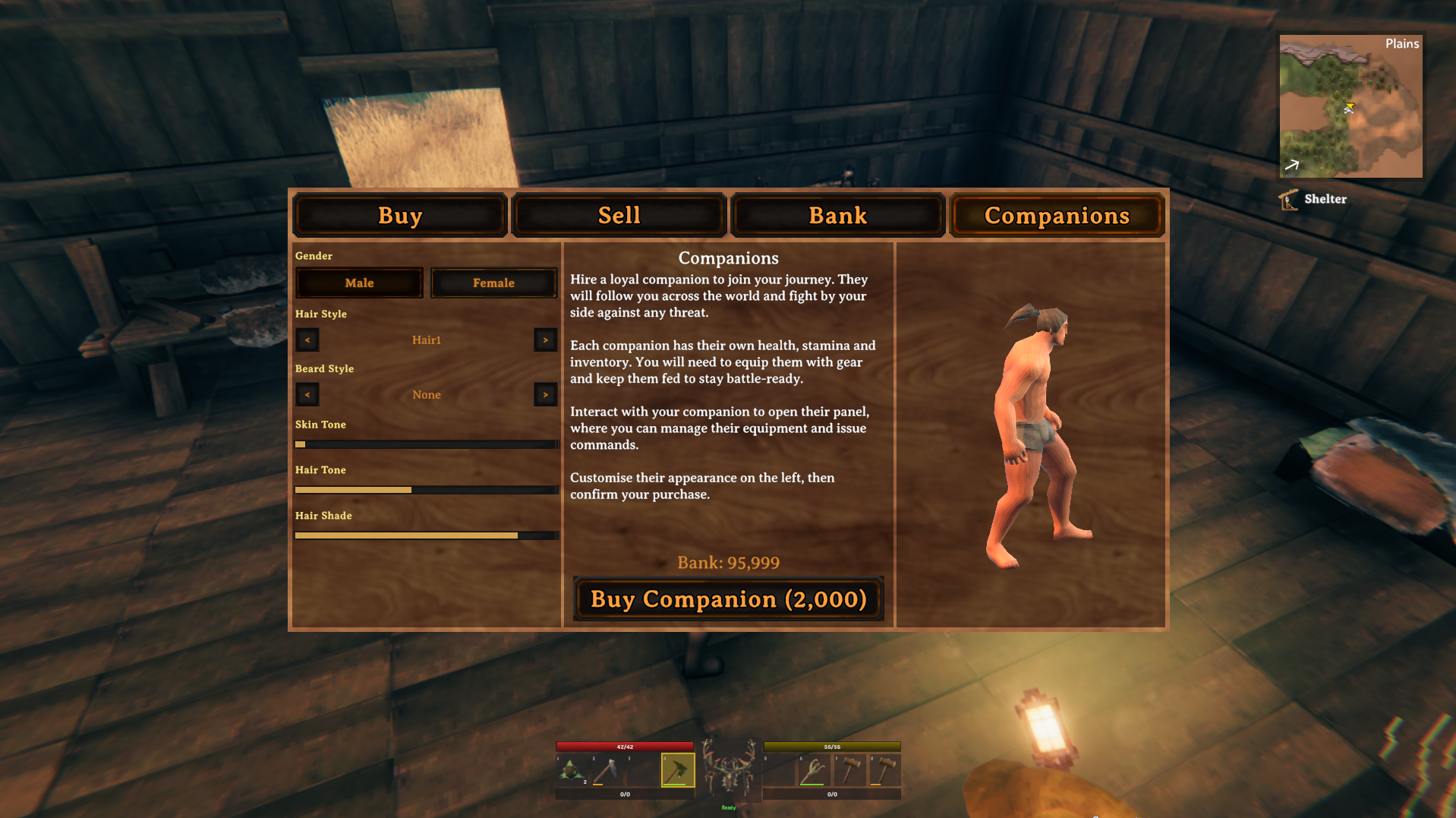
### Starter Companion A companion automatically spawns with you when you enter a new world for the first time. Each character gets one free companion per world. Disable this with the `SpawnStarterCompanion` config setting. ### Purchase (Optional) Install [Trader Overhaul](https://github.com/JoeCorrell/TraderOverhaul) to unlock the **Companions** tab in Haldor's shop and recruit additional companions. Each costs **2,000 coins** from your bank balance. Customize their gender, hair, beard, skin tone, and hair color in the 3D preview before confirming. This dependency is optional — the mod works fully without it. ### Interact **Tap E** on your companion to open their inventory panel. Manage gear, feed food, rename them. **Hold E** (or **X on gamepad**) to open the radial command wheel for quick access to all action modes and toggles. ### Command Point your crosshair at objects in the world and press the command hotkey to issue contextual orders. The companion figures out what to do based on what you're looking at. |

|
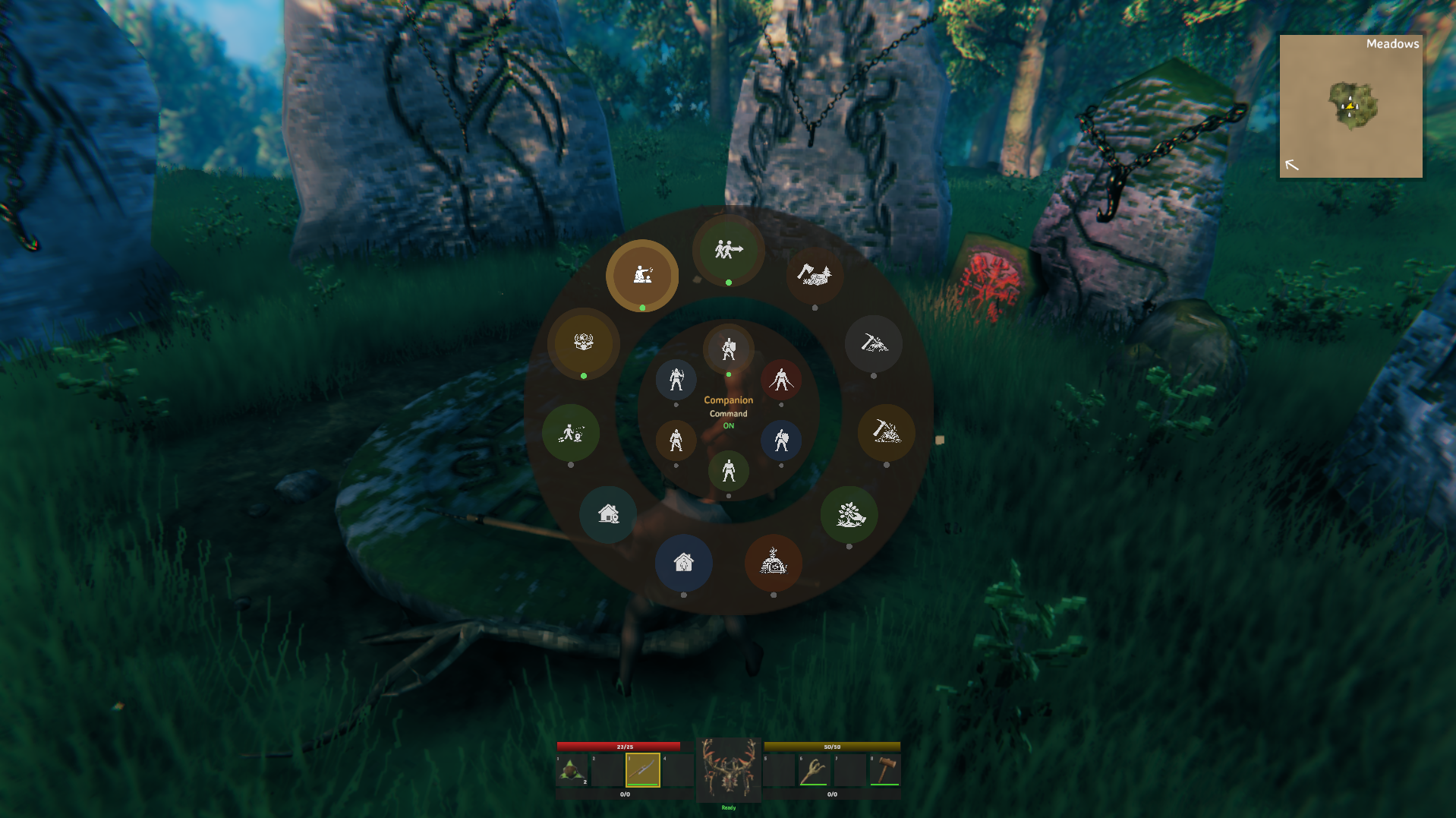
**Hold E** (keyboard) or **X** (gamepad) on a companion to open the radial command wheel. Move the mouse or gamepad stick to highlight an option, then click or press E to select. You can select multiple options before closing. Press **Escape** or **B** to close. The companion's name is shown in the center. Active toggles show their current ON/OFF state. | Segment | Type | Description | |:---|:---|:---| | **Follow** | Toggle | Companion follows you (default ON). Can be combined with any gather mode. Overrides Stay Home when ON | | **Gather Wood** | Mode | Autonomously find and chop trees, logs, and stumps nearby | | **Gather Stone** | Mode | Autonomously find and mine rocks nearby | | **Gather Ore** | Mode | Autonomously find and mine ore deposits nearby | | **Forage** | Mode | Autonomously find and pick berry bushes, mushrooms, flowers, and ground items nearby | | **Smelt** | Mode | Autonomously refill kilns and furnaces with fuel/ore from chests, collect smelted output | | **Farm** | Mode | Autonomously harvest ripe crops, replant seeds, and deposit produce into chests | | **Farm Zones** | Action | Define square planting zones with specific crop assignments (right-click Farm segment) | | **Fish** | Mode | Autonomously fish nearby water — requires fishing rod + bait in inventory | | **Hunt** | Mode | Autonomously hunt Boar, Deer, Chicken, and Hare with ranged weapons | | **Cook** | Mode | Autonomously cook meals at a Cauldron, brew mead bases, fill Fermenters, and tap ready Fermenters | | **Repair Buildings** | Mode | Periodically scan for and repair damaged player-built structures within 50m | | **Restock** | Mode | Periodically refuel campfires, torches, and hearths below 50% fuel capacity | | **Stay Home** | Toggle | Patrol the home position instead of following you | | **Set Home** | Action | Save the companion's current position as their home point | | **Wander** | Toggle | Roam up to 50m around home (ON) or stay put (OFF) | | **Auto Pickup** | Toggle | Automatically pick up nearby dropped items | | **Command** | Toggle | Accept directed commands from the point-to-command hotkey | | **Despawn** | Action | Permanently remove the companion (drops a tombstone with their items). Requires double-click to confirm | > Gather modes are mutually exclusive. Selecting a gather mode switches away from the previous one. Tapping an active gather mode deselects it. Follow is an independent toggle that can be combined with any mode. |

|
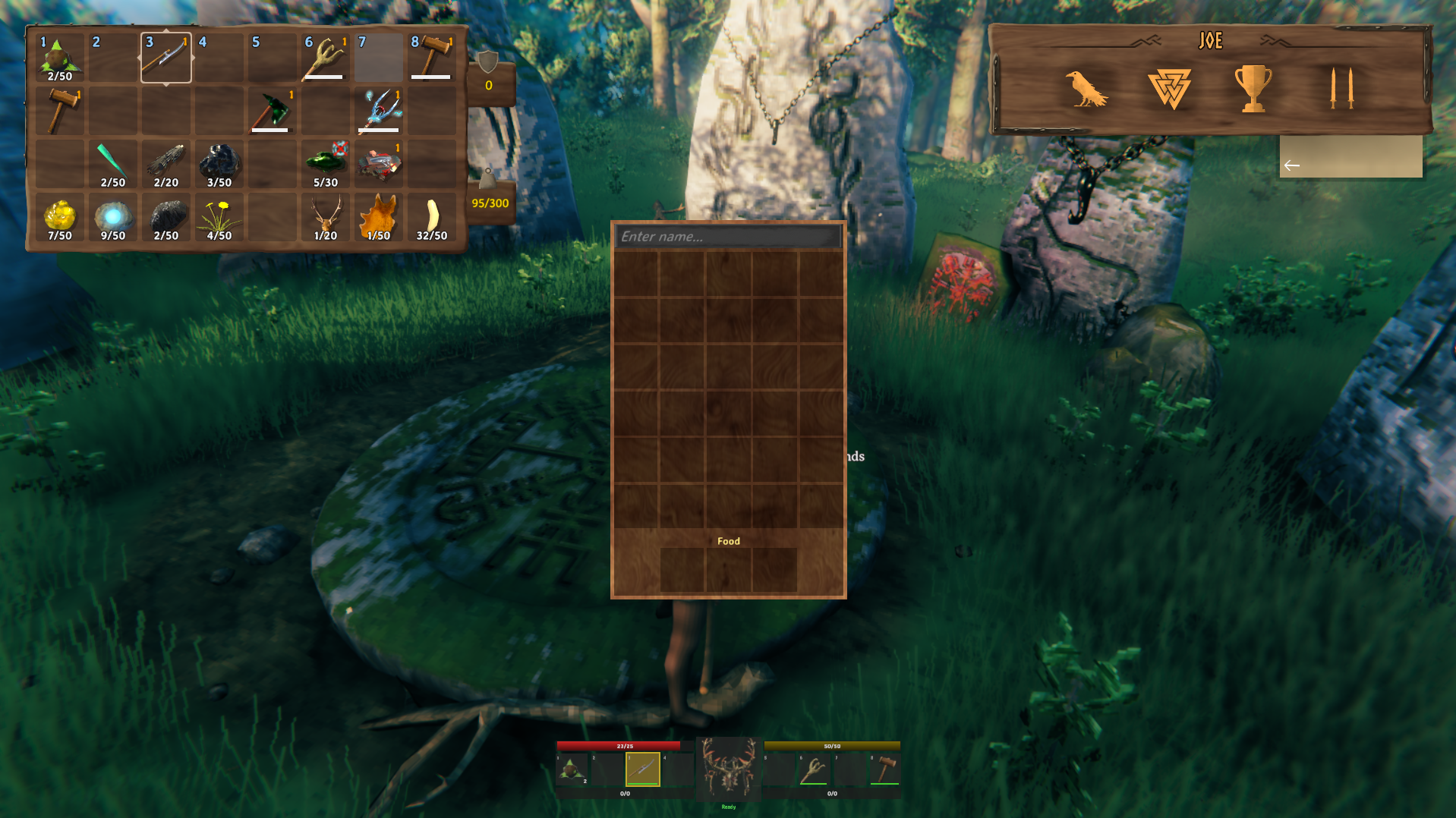
**Tap E** on a companion to open the inventory panel alongside the standard inventory GUI. The panel shows: - **Name field** - rename your companion (persists in save) - **8x4 inventory grid** (32 slots, 300 weight capacity) - drag items in and out, view durability bars, equipped items highlighted in blue - **3 food slots** - showing active food effects and remaining duration Companions **auto-equip the best gear** from their inventory: best weapon, shield, chest, legs, helmet, shoulder, and utility item. Items equip one at a time with proper animation. Broken items (0 durability) are skipped and unequipped. Right-click an item to use/equip it. Right-click food to feed it to the companion. Right-click a **potion or mead** to make the companion consume it — the status effect is applied and displayed in the player's HUD bar. Drag items between your inventory and theirs using vanilla drag-and-drop. **Ctrl+click** an item to instantly move it between inventories (player → companion or companion → player). Press **F7** while the panel is open to enter **UI Reposition Mode** — click and drag the panel to move it anywhere on screen. Press **F7** again to confirm. Your custom position is saved and persists across sessions. |

|
Companions run on a **custom AI system** (`CompanionAI`) built from scratch on top of Valheim's `BaseAI` pathfinding. This is not a repurposed MonsterAI. It's a purpose-built AI loop designed specifically for companion behavior. ### Follow & Formation When following you, each companion is assigned a formation slot. Multiple companions spread out around you instead of stacking on top of each other. When far away (>15m), they sprint straight to you; when close, they maintain formation offset. They use vanilla pathfinding and navigation mesh for movement. ### Target Management Companions scan for enemies every 2-6 seconds depending on distance from you. Once they lock onto a target, they **commit** and won't bounce between enemies. A directed target from the command hotkey locks for 10 seconds. In gather modes, targeting is suppressed unless an enemy enters **self-defense range** (10m). ### Sleep & Wake Companions support Valheim's sleep/wake RPC system. They can be directed to sleep in beds and will wake automatically when enemies approach. ### Movement Mirroring Companions mirror the player's movement state while in formation. When you walk, they walk. When you crouch, they crouch. Speed overrides clear automatically when catching up from distance or entering combat. ### Obstacle Avoidance (Context Steering) A 13-ray, 180-degree forward arc system scores candidate movement directions by balancing goal-seeking with obstacle repulsion. Smoothly steers companions around walls, furniture, smelters, and other structures the NavMesh doesn't model. Uses a dual-mask system so companions can approach smelters/chests without spinning, while still detecting half-walls and fences when stuck. ### Stuck Detection & Recovery Built-in stuck detection nudges companions clear of furniture colliders, beds, and chairs that block pathfinding. When stuck behind obstacles, the AI probes 8 directions via raycast to find the best escape angle, prioritizing routes around the obstacle toward the target. A proactive jump system detects minor terrain step-ups and clears them automatically. When the NavMesh path passes through an impassable half-wall or fence, path-stuck detection switches to context steering with a piece-aware mask to navigate around it. ### Hazard Avoidance Companions use water-avoiding pathfinding and actively monitor for tar pits and deep water. If caught in a hazard, they immediately disengage combat and seek the nearest shore. Proactive water sampling stops the companion before entering water when stamina is low. ### Target Blacklist Positions that cause stuck navigation are blacklisted for 30 seconds. All controllers skip blacklisted positions on future scans, preventing the companion from repeatedly trying to reach unreachable targets. ### Stay Home Patrol When Stay Home is active, the AI switches from following you to patrolling the home position. Combined with gather modes, they'll autonomously harvest resources near home without you being present. |

|
Companions use a **defensive-first combat system**. They actively scan for incoming threats and react before attacking. ### Melee Combat - **Threat detection** - scans nearby enemies for attack animations and incoming projectiles - **Shield blocking** - raises shield when threats are active, holds block through the attack - **Perfect parry** - every timed block is a perfect parry (block timer reset on impact) - **Counter-attacks** - drops shield and strikes immediately after blocking - **Power attacks** - delivers a heavy attack when an enemy is staggered (3s cooldown) - **Dodge** - sidesteps perpendicular to incoming attacks when stamina allows ### Ranged Combat - Equips a bow when the target is beyond 20m, switches back to melee under 12m - Arrows are aimed at the target's center mass with **velocity leading** (aims ahead of moving targets) and **gravity compensation** (aims higher for arrow drop) ### Combat Behavior - **Backstab immunity** - companions cannot receive backstab bonus damage from enemies attacking from behind - **Retreats** when health drops below 30% or stamina below 15% - **Stamina-aware retreat** - when stamina triggers a retreat, companions walk instead of run and use defensive blocking with their shield, allowing stamina to regenerate instead of draining further - **Opportunistic attacks** - companions can still attack enemies that wander into melee range during retreat - **Stamina-aware approach** - companions walk instead of run toward enemies when stamina is below 25% - **Re-engages** after recovering above 50% health and 30% stamina - **Crossbow support** - crossbow bolts (`AmmoNonEquipable`) are detected for ranged ammo selection - Retreat distance is 12m from the target - Tools and pickaxes are **never used in combat**. Auto-equip forces a switch to a proper weapon ### Stamina System Companions have their own stamina pool (base 50 + food bonus) with regeneration. Stamina is consumed by attacks, blocking, running, and swimming. When stamina hits zero, attacks fail and blocks don't hold. Stamina only drains while the companion is actually moving (velocity > 0.5 m/s), preventing phantom drain during combat oscillation. |

|
The radial menu has an **inner ring** with four combat stances that control how companions fight. Move the mouse closer to the center of the radial wheel to select a stance. The active stance is highlighted and persists across sessions. | Stance | Effect | |:---|:---| | **Balanced** | Default behavior. Standard retreat thresholds, normal blocking, dodging, and power attacks | | **Passive** | Never attacks. Suppresses all targeting and combat. The companion simply follows you or idles at home | | **Ranged** | Forces bow equip and maintains distance. Prevents AutoEquipBest from overriding the bow. Falls through to melee if no bow or arrows are available | | **Melee** | Forces melee weapons even when a bow is available. Prevents ranged weapon equip during combat | Stances persist to ZDO and can be changed mid-combat. |

|
Set a companion to **Gather Wood**, **Gather Stone**, **Gather Ore**, or **Forage** via the radial wheel or directed command. They'll autonomously find, walk to, and harvest nearby resources. ### Gather Behavior - **Wood** - chops trees, fallen logs, and stumps. Prioritizes fallen logs and stumps over standing trees (3x distance penalty on standing trees). - **Stone** - mines rock formations (MineRock). - **Ore** - mines ore deposits (pickaxe-vulnerable destructibles that are chop-immune). - **Forage** - walks to and picks berry bushes, mushrooms, flowers, dandelions, branches, and stones. No tool required. ### Smart Tool Use The companion automatically equips the best matching tool from their inventory. Axe for wood, pickaxe for stone and ore. The tool stays equipped until gathering stops. Companions **won't chop trees** if their axe doesn't meet the tree's minimum tool tier — preventing wasted durability on resources they can't damage. ### Drop Collection After destroying a resource, the companion scans within 8m for item drops and picks them up one at a time with natural pacing before moving to the next target. ### Overweight Gathering stops automatically at **298/300 weight**. The companion reverts to Follow mode and announces they're overweight. ### Self-Defense If an enemy enters within 10m during gathering, the companion pauses to fight, then resumes gathering once the threat is gone. > Point at a specific tree, rock, or ore node and press the command hotkey to direct the companion straight to it. |

|
Set a companion to **Smelt** via the radial wheel and they'll autonomously manage nearby kilns and furnaces. Place them near your smelting setup with chests of ore and fuel, and they'll handle the rest. ### How It Works The companion continuously scans for smelters within 25m and keeps them running: 1. **Refill kilns** first (they produce charcoal for furnaces) 2. **Refill furnaces** with smart priority: ore first when fuel is adequate, fuel when critically low 3. **Collect smelted output** (bars, coal) from ground drops and queued output 4. **Deposit output** into nearby chests with available space ### Smart Behavior - **Inventory-first**: if the companion already has fuel or ore in their inventory, they go straight to the smelter instead of visiting a chest - **Chest animations**: opening and closing chests plays the proper animation and sound effects - **Smelter effects**: inserting fuel or ore plays the smelter's sound effects and feeding animation - **Correct positioning**: the AI navigates to the correct interaction side of each smelter (fuel side, ore side, output side) - **Carry limits**: up to 20 ore or 40 fuel per trip to prevent overweighting ### Combine with Stay Home Set **Stay Home + Smelt** and the companion will manage your smelting operation autonomously near their home position. Perfect for unattended base smelting while you're out exploring. > Companions will pause smelting to fight any enemies that enter self-defense range, then resume when the threat is gone. |

|
Set a companion to **Farm** via the radial wheel and they'll autonomously manage your crop fields. Place them near cultivated soil with seed chests and output chests, and they'll handle the full cycle. ### How It Works 1. **Harvest** ripe crops on cultivated soil 2. **Collect drops** one-at-a-time with natural pacing 3. **Fetch seeds** from a nearby chest when inventory runs low 4. **Plant seeds** on empty cultivated soil in a grid layout 5. **Deposit produce** into a nearby output chest ### Farm Zones Designate square planting areas where companions plant specific crops in a grid layout. Right-click the **Farm** radial segment to enter zone placement mode, or use the configurable hotkey (default **Alt+Z**). - **Place zones**: LMB to place a zone (up to 4 per companion), scroll wheel to resize (2m-15m), Q/E to rotate - **Assign crops**: after placing a zone, a crop picker popup lets you assign a specific crop or "Any Crop" - **Remove zones**: RMB on an existing zone to delete it, Escape to exit placement mode - **Zone-aware planting**: companions only plant inside defined zones — with no zones defined, planting is disabled - **ZDO persistence**: zones persist across sessions, zone transitions, and server restarts ### Smart Behavior - **Crop detection**: only picks cultivated crops — ignores wild pickables (berries, mushrooms, thistle, etc.) - **Dynamic crop support**: crop/seed mapping is built at runtime from the game's prefab list, supporting all modded crops automatically - **Cultivator required**: a cultivator must be in the companion's inventory to plant seeds; without one they enter harvest-only mode - **Priority rotation**: alternates between harvest-priority and plant-priority every 30 seconds to keep both tasks progressing - **Overweight protection**: stops at 298 weight and reverts to follow mode ### Combine with Stay Home Set **Stay Home + Farm** and the companion will manage your crop fields autonomously. Farm mode also integrates into the Homestead task rotation cycle. > Companions will pause farming to fight any enemies that enter self-defense range, then resume when the threat is gone. |

|
Set a companion to **Fish** via the radial wheel and they'll autonomously fish nearby water. Give them a **fishing rod** and **bait** in their inventory, and they'll handle the rest. ### How It Works 1. **Find water** - scans up to 30m for fishable water (ocean, rivers, ponds) with sufficient depth 2. **Walk to shore** - pathfinds to the nearest shore position with a safe standoff distance 3. **Cast** - faces the water, equips the fishing rod, and plays the full cast animation 4. **Wait for nibble** - waits 15-20 seconds for a fish to bite (10% chance of a miss per wait) 5. **Hook and reel** - 85% chance to hook the fish, then reels in over 4-6 seconds with stamina drain 6. **Collect catch** - determines the fish type from bait probability tables, adds it to inventory, and announces the catch 7. **Recast** - automatically recasts if bait remains; stops when bait runs out or inventory is full ### Smart Behavior - **Bait-aware catch tables**: fish type is determined by which bait is equipped, using the same probability tables as vanilla fishing — different baits catch different fish - **Catch feedback**: companion announces every catch with overhead speech and a skill levelup sound effect - **Stamina drain**: reeling costs stamina; if stamina runs out mid-reel, the fish escapes - **Missing gear detection**: companion speaks up if they're missing a fishing rod or bait - **No water nearby**: companion announces if no fishable water is found within scan range ### Combine with Stay Home Set **Stay Home + Fish** near a body of water and the companion will fish autonomously. Perfect for passive fish farming while you're out exploring. > Companions will pause fishing to fight any enemies that enter self-defense range, then resume when the threat is gone. |

|
Set a companion to **Hunt** via the radial wheel and they'll autonomously hunt passive wildlife: **Boar**, **Deer**, **Chicken**, and **Hare**. ### How It Works - Companions scan for prey within their home radius (or 20m in follow mode) - Hunting is **ranged-only** — companions maintain distance so prey don't flee out of range - After a kill, the companion walks to the body and collects all drops - If prey runs beyond range, the companion disengages rather than chasing indefinitely ### Smart Behavior - **Standoff distance**: companions stay at bow range (8m+) to prevent spooking prey - **Home zone aware**: companions with Stay Home enabled only hunt within their home radius - **Self-defense**: if an enemy attacks while hunting, the companion fights the threat first, then resumes - **Drop collection**: companion waits briefly at the kill site for all drops to spawn, then collects them naturally > Companions need a bow and arrows in their inventory to hunt effectively. |

|
Set a companion to **Cook** via the radial wheel and they'll autonomously manage food production and mead brewing near their home. Give them access to a **Cauldron**, ingredient chests, and Fermenter setups — they'll handle the full cycle. ### How It Works 1. **Cook food** — scans nearby chests for ingredients, fetches them, walks to the Cauldron, and crafts meals. Prioritizes recipes that use available ingredients 2. **Brew mead** — crafts mead bases at the Cauldron using ingredients from chests 3. **Fill Fermenters** — carries mead bases to empty Fermenters and inserts them 4. **Tap ready Fermenters** — collects finished meads when fermentation is complete, picks up the drops 5. **Store output** — deposits crafted food and meads into nearby output chests ### Smart Behavior - **Ingredient-first**: checks companion inventory before visiting chests — skips the chest trip if already stocked - **Animated chest interactions**: opens and closes chests with sound, transfers items at natural pace - **Fermenter claiming**: each companion claims individual Fermenters to prevent two companions from conflicting - **Hungry priority**: when used in Homestead mode, Cook only activates when the companion is hungry — keeps them fed automatically ### Combine with Stay Home Set **Stay Home + Cook** near your cauldron and Fermenter setup. The companion will maintain a steady supply of cooked food and meads without supervision. > Companions need access to a Cauldron and the required ingredients in nearby chests. A cultivator is not required. |

|
Point your crosshair at objects in the world and press the **command hotkey** to issue contextual orders. All owned commandable companions receive the command simultaneously. | Target | Action | |:---|:---| | **Enemy** | Direct attack, locks target for 10 seconds | | **Tree / Rock / Ore** | Enter gather mode for that resource, directed to that specific node | | **Crafting Station** | Walk to station and repair all compatible gear | | **Cart** | Closest companion attaches to cart and hauls it (press again to detach) | | **Ship** | Find the ladder, path to it, and board the ship. Companions sit on deck during the voyage | | **Bed** | Walk to bed and sleep (press again to wake) | | **Fireplace** | Walk to fire and sit down | | **Chest** | Walk to chest and deposit non-essential items (keeps equipped gear, food, weapons, armor) | | **Door** | Walk to door and open it | | **Tombstone** | Walk to the companion's tombstone and recover their items | | **Ground / Terrain** | Walk to that position and wait | | **Nothing / Sky** | Cancel all commands, return to following you | **Long press** the command hotkey (0.4s) to recall all companions. Cancels everything and restores follow mode. They'll say "Coming!" and head straight to you. > The command hotkey must be configured in the BepInEx config file. Works on both keyboard and gamepad. |

|
Toggle **Stay Home** in the radial to anchor a companion near their home position. Use **Set Home** to mark where they should stay. They'll patrol within range instead of following you. ### Homestead Mode (Autonomous Base Maintenance) When **Stay Home** is ON and **Follow** is OFF, companions automatically maintain your base. Tasks rotate every 60 seconds in a round-robin cycle: | Task | What It Does | |:---|:---| | **Repair** | Scans for damaged player-built structures within 40m, walks to each one, plays hammer animation, fully repairs them | | **Refuel** | Detects campfires, hearths, torches, sconces, and any fireplace below 30% fuel. Fetches the correct fuel type from nearby chests and adds fuel one unit at a time | | **Sort** | Finds items split across multiple chests and consolidates smaller stacks into larger ones | | **Smelt** | Cycles smelting duties (refill kilns/furnaces, collect output, deposit bars) | | **Farm** | Harvests ripe crops, replants seeds from chests, deposits produce | | **Cook** | Cooks meals at the Cauldron and manages Fermenters when the companion is hungry | | **Wander** | Walks around the home area for 30-60 seconds, chaining random waypoints within the home radius | | **Sit** | Finds nearby chairs and stools, walks over, sits down for 30-90 seconds with proper animation, then stands and resumes | | **Use workstation** | Walks to a nearby workbench or forge and stands at it briefly (cosmetic) | Tasks are selected by weighted random with per-behavior cooldowns, creating natural living-at-home behavior instead of rigid rotation. All chest interactions are slow and animated: the chest opens with a creak sound, items transfer one-by-one at 0.6s intervals, then the chest closes with sound. Companions speak contextual lines while performing each task. ### Gathering + Auto-Deposit Combine **Stay Home + Gather mode** and they'll harvest resources near home autonomously. When their inventory fills up (298 weight), direct them to a chest and they'll walk over and deposit everything except equipped gear, food, and weapons, then go right back to gathering. Toggle **Wander** to control patrol range: - **Wander ON** - roams up to 50m around home - **Wander OFF** - stays exactly at the home point > Perfect for base-side wood farms, mining outposts, and fully automated bases. Set them up and leave. |

|
Companions periodically scan their equipped gear. When any item drops below **50% durability**, they'll walk to the nearest compatible crafting station (workbench, forge, etc.) and repair everything they can. Point at a specific crafting station and press the command hotkey to direct them there immediately, regardless of durability threshold. |

|
Companions have **three food slots** that work exactly like player food. Same bonuses, same burn timers, same front-loaded curve. - **Base health:** 25 HP + food bonus - **Base stamina:** 50 + food bonus - Food provides health regen, stamina regen, and Eitr bonuses - Companions **auto-consume food** from their inventory when a slot is empty - **Meads are used automatically** - health meads when below 50% HP, stamina meads when below 25% stamina (10s cooldown) - **Potions** can be manually given by right-clicking them in the companion's inventory — status effects (healing, resistance, stamina, etc.) are applied and shown in the player's HUD bar alongside the player's own effects - Duplicate potion effects are prevented — if the same effect is already active, consumption is blocked Feed food by right-clicking consumables in the companion's inventory, or let auto-consume handle it. They'll speak up when hungry. |

|
Companion gear works like player gear: - **Weapons** lose durability on every attack. When broken, they're unequipped automatically. - **Armor** absorbs damage and loses durability when hit. Full vanilla armor reduction formula applies. - **Durability bars** appear on inventory slots and overhead when looking at the companion. - Broken items are skipped by auto-equip and must be repaired at a crafting station. |

|
Companions detect when they're stuck behind a closed door and automatically open it, walk through, and close it behind them. They also proactively scan for doors when circling a building trying to reach you. Respects ward protection and locked doors. Companions won't open doors they shouldn't. > You can also point at a door and press the command hotkey to tell them to open it directly. |

|
### Campfire Sitting When you sit by a burning campfire (using the sit emote), nearby companions in Follow mode will join you. They walk to the fire and sit down facing it. They'll stand up if you do, if enemies appear, or if the fire goes out. Point at a fireplace and press the command hotkey to explicitly tell them to sit. ### Bed Sleeping Point at a bed and press the command hotkey to tell companions to sleep. They'll walk to the bed, lie down, and stay asleep until you wake them (same command again) or enemies appear. ### Resting Benefits While sitting or sleeping near a fire, companions receive the **Rested** buff. The buff provides **doubled stamina regen**, bonus HP regen, and a **+50% skill XP bonus**. Duration is based on comfort level (base 5 minutes + 1 minute per comfort level from nearby furniture). ### Passive Resting Companions also receive the Rested buff automatically when standing near a heat source inside a shelter for the warmup duration, matching vanilla player behavior without requiring a directed sit or sleep command. ### Bed Spawn Point When a companion sleeps in a bed, that bed becomes their **spawn point**. If the companion dies, they'll respawn at the last bed they slept in instead of at the world spawn. Stay Home state is automatically restored on respawn. |

|
Companions teleport with you through **portals** and **dungeon entrances** automatically. No commands needed — active followers warp to your destination when you arrive. - Companions in **Stay Home** mode are excluded — they remain at their post - Works even if the companion's zone unloaded during the teleport - Cancels any active rest state (sitting/sleeping) before warping to prevent animation glitches |

|
Companions are marked on the **minimap** with a visible icon so you always know where they are. Markers are only visible to the companion's owner — other players won't see your companions on their map. When a companion dies, a **death marker** is placed at their tombstone location to help you find it. |

|
Companions **level up skills** just like the player. As they fight, gather, and work, their skills improve over time with progressive buff gains that increase their effectiveness. Skills are persisted to ZDO. On death, companions lose **25%** of their skill progress (configurable via `DeathLossFactor`). |

|
Companions can swim but will **slowly drown** if their stamina is fully depleted in water. Feed them stamina food before ocean voyages. Companions also intelligently board ships — point at a boat and they'll find the ladder, path to it, and climb aboard. |

|
Companions have context-aware speech that triggers every 20-40 seconds, with a 5-second cooldown between lines. Speech can be **overhead text**, **voice audio**, or both, configured independently per gender. ### Voice Audio Male voice audio clips are included with the mod and play automatically. Place additional or custom MP3 files in `Audio/MaleCompanion/{Category}/` and `Audio/FemaleCompanion/{Category}/` alongside the plugin DLL. Categories: `Action`, `Combat`, `Follow`, `Forage`, `Gather`, `Hungry`, `Idle`, `Overweight`, `Repair`, `Smelt`. If a female voice pack is missing clips for a category, male clips are used as fallback. ### Speech Lines Text lines are loaded from `speech.json` (auto-generated on first run). Edit this file to customize what companions say. Lines are shared across all companions regardless of gender. Language-specific speech files can be placed in `Translations/speech/{Language}.json` — the mod checks for the current language first, then falls back to `speech.json`. | Context | Example Lines | |:---|:---| | **Combat** | "For Odin!", "Taste my steel!", "By Thor's hammer!" | | **Overweight** | "By Odin's beard, my back is breaking!" | | **Hungry** | "My belly roars like a troll..." | | **Needs Repair** | "This blade has seen better days." | | **Gathering** | "The land provides, if you know where to look." | | **Foraging** | "The meadows offer their gifts." | | **Smelting** | "The forge fire burns bright.", "Good ore makes good steel." | | **Following** | "Lead on, I am your shield." | | **Idle** | "The winds whisper of adventure..." | | **Commands** | "By your word!", "So it shall be." | ### Config Options | Setting | Default | Description | |:---|:---|:---| | `MaleShowOverheadText` | `false` | Show overhead speech text for male companions | | `MaleEnableVoiceAudio` | `true` | Play voice audio clips for male companions | | `FemaleShowOverheadText` | `true` | Show overhead speech text for female companions | | `FemaleEnableVoiceAudio` | `false` | Play voice audio clips for female companions | Each directed command type (attack, sit, sleep, repair, deposit, etc.) also triggers its own immediate speech line. |

|
When looking at a companion, the vanilla enemy HUD is extended with extra stat bars below the health bar: - **Yellow bar** - current stamina - **Brown bar** - current inventory weight (percentage of 300 max carry weight) The weight bar fills as the companion's inventory gets heavier, giving you an at-a-glance indicator of when they're getting full. This lets you check a companion's status from a distance without opening their inventory. |

|
A compact status panel is drawn **below the minimap** in the top-right corner of the HUD showing every active companion at a glance. Each row displays: - **Name** — companion's current name - **HP bar** (red gradient) — current health as a percentage of max - **Stamina bar** (yellow gradient) — current stamina - **Weight bar** (brown gradient) — carry weight as a percentage of the 300 max - **Rested icon** — lit when the companion has the Rested buff active, showing remaining duration - **Status effect icons** — active status effects (buffs, debuffs) shown as small icons The panel matches the minimap width and stacks one row per companion. It hides automatically when the full map is open and disappears when no companions are present. Stacks as many rows as needed for multiple companions. Can be disabled entirely with the `ShowMinimapHudPanel` config setting. |

|
All values below are defaults and can be changed in the F8 config panel or BepInEx .cfg file. | Stat | Default | |:---|:---| | **Price** | 2,000 coins (from bank) | | **Base Health** | 25 HP (+ food bonus) | | **Base Stamina** | 50 (+ food bonus) | | **Carry Weight** | 300 | | **Walk Speed** | 2 m/s | | **Run Speed** | 7 m/s | | **Gather Stop Weight** | 298 (stops harvesting) | | **Home Leash Radius** | 50m (Stay Home mode) | | **Auto-Repair Threshold** | 50% durability | | **Retreat Threshold** | 30% HP or 15% stamina | | **Re-engage Threshold** | 50% HP and 30% stamina | |

|
Everything about a companion is stored in ZDO and persists across: - Game sessions and server restarts - Zone transitions and area loading - Player deaths and respawns Saved state includes: appearance, name, inventory, equipment, action mode, home position, all toggle states, food timers, and ownership. Follow targets are automatically restored after player respawn. |

|
All UI labels, radial menu text, hover text, HUD messages, speech lines, and directed command speech are fully translatable. The mod integrates with Valheim's built-in Localization system. ### How It Works Translation keys are injected into Valheim's `Localization.m_translations` dictionary when the game loads. This means all `$key` patterns work automatically, including vanilla key bindings like `$KEY_Use`. ### Translation Files - **`Translations/English.json`** is auto-generated on first run with all translation keys - To add a new language, copy `English.json` to `Translations/{Language}.json` (e.g., `French.json`) and translate the values - The mod loads the file matching the current Valheim language setting, falling back to English if not found - Speech lines support per-language files via `Translations/speech/{Language}.json` ### For Translators Translation files use a simple JSON format with `key`/`value` pairs. All mod keys use the `hc_` prefix. Contribute translations by adding a new language file to the `Translations/` folder. |

|
Press **F8** (configurable) at any time to open the in-game configuration panel. All gameplay constants are exposed as configurable settings organized into tabbed categories: General, Combat, AI, Movement, Food, Stamina, Harvest, Smelting, Farming, Repair, Homestead, Rest, Speech, Skills, Controls, and more. - **Sliders** for numeric values with configured min/max ranges - **Toggle buttons** for boolean settings - **"Mod Options"** button added to the vanilla ESC pause menu for easy access - Settings are saved to the BepInEx config file and persist across sessions All settings can also be edited directly in the `BepInEx/config/` .cfg file. |

|
**1.** Install [BepInEx](https://valheim.thunderstore.io/package/denikson/BepInExPack_Valheim/) for Valheim **2.** Download the latest release from [Releases](https://github.com/JoeCorrell/OfflineCompanions/releases) **3.** Extract to `BepInEx/plugins/Companions/` **4.** *(Optional)* Install [Trader Overhaul](https://github.com/JoeCorrell/TraderOverhaul) to purchase additional companions from Haldor's shop **5.** Launch the game |

|
| Dependency | Version | Required | Link | |:---|:---|:---|:---| | Valheim | `0.219+` | Yes | | | BepInEx | `5.4.2200+` | Yes | [Download](https://valheim.thunderstore.io/package/denikson/BepInExPack_Valheim/) | | Trader Overhaul | `latest` | Optional | [GitHub](https://github.com/JoeCorrell/TraderOverhaul) | |

|
- **Trader Overhaul** is optional. If installed, the Companions tab is injected into its custom trader UI for purchasing additional companions - Companions use a custom `HC_Companion` prefab registered at startup - Other NPC / follower mods should be compatible unless they patch `BaseAI` broadly - **Multiplayer:** companions are owned by the spawning player via ZDO ownership. Other players cannot interact with companions they don't own |

|
Built on [BepInEx](https://github.com/BepInEx/BepInEx) and [Harmony](https://github.com/pardeike/Harmony) Optionally integrates with [Trader Overhaul](https://github.com/JoeCorrell/TraderOverhaul) for trader UI |


Forged for the Valheim community ❤️ Skol, Vikings.